Hi, if you’ve been invited to join the sprawlsocial mastodon server. Welcome 🙂
Open Hours
This server is open from 9am – 11pm typically
This server operates on a second hand computer in a home in Naarm,
This is a social media server for people located in Naarm looking for an alternative to big-tech platforms and mastodon servers that may be hosted inside datacenters.
Download the app!
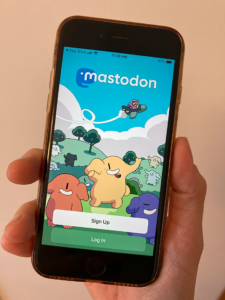
A good way to start getting used to using mastodon or posting / interacting with others is to download the app on your mobile device and login 🙂
Just search mastodon on your preffered application distributor
Finding People
This server is federated, however you may need to search for people that are not on this server by using their full username and domain.
If you put this in your search bar you should be able to follow these accounts
Enjoying Mastodon
Digital Justice Society is a group based on Kaurna Land on the continent of so-called Australia. They posted on Mastodon this useful tip to enjoy mastodon a bit more
We recommend you do a bunch of following to get your feed going. Aim to folllow ~50 people over a couple of weeks.
A good place to start is followers of accounts you admire. Start by looking at our followers if you like . It’s easy to go down someone’s list of followings and just hit follow follow follow.
On most corporate social media they’ve taken the drivers seat and control what you see. You’ve got that control back, it takes a moment to collate.
But it’s worth it!
Posted by @digital_justice_society@adlsolarpunk.net
Want to help out?
Feel free to reach out to Lucas on the server just set your post to private mention and tag @lucas@m.sprawlsocial.com — this is essentially the same as a direct message on mastodon.
We can discuss potentially helping run the server.
Creating onboarding materials.
Collaborating with a group of like-minded people that want to help others get off big-tech
Potentially help with moderating or discussing governance.
Any other ideas? Have ideas, mods, anything at all?
Help create a swarm for reduced down time and user data backups to help with resilience
Mastodon is an open source and decentralised operating system on the fediverse. It is designed as an alternative to twitter.
If you would like to join a small locally operated Mastodon server or even engage in helping what that might look like, coming to decisions on the server etc… let me know next week. Currently most major Mastodon servers rent space in data centres. However this one does not and operates locally on second hand hardware.
Other popular decentralised social media alternatives include PixelFed and PeerTube
Merri-Bek Tech Group
Check out the Merri-Bek Tech group and their lo-res tech project looking, great way to chat and work on creating resilient tech solutions for and by people.
Tails is a portable operating system that protects against surveillance and censorship. It is a distribution of linux with handy tools such as the Tor Browser
AirGapped Systems
Put simply; an air gap is the gap of absolutely no connection to other networks, this can be by destroying or temporarily removing the physical hardware capabilities.
Lineage OS is an open source android project that aims to help people to continue to be able to use their older android devices after software updates are stopped and are no longer supported by the manufacturers. These are maintained by people, and you can even contribute or look into building your own if you have a niche old android phone.
Books galore, free books! Most books and a lot of journal articles are uploaded every day. You can import them onto kindles, or other e-readers quite easily.
I recommend finding the latest mirror links on their respective wikipedia pages, as sometimes links go down.
Shoutout aswell to AudioBookBay for any audio book lovers. There are apps you can download that will save your position and show chapters on some files too.
~~~~~ Side Note on liberating knowledge for all.
The curious should take a look into Arron Schwartz, and the Guerrilla Open Access Manifesto. Aaron, is a massive contribution and reason for the pervasive continuation of the book and journal article digital liberation movement. And was an incredible visionary, creative, activist, and hacker. Rip Aaron. <3
As reported by the BDS movement here – Spotify actively Profits from apartheid, genocide, and racist deportations ~
“In October 2025, Spotify users began to hear racist recruitment ads for the U.S. Immigration and Customs Enforcement (ICE), as the agency continues to terrorize immigrant communities and those in solidarity with them across the country. Though the ICE ads have reportedly expired, Spotify has refused to change its policies, defending the ads as consistent with their company standards. “
“Spotify’s founder (and CEO until December 2025), Daniel Ek, is the chairman of German military AI company Helsing, and has personally invested his wealth gained from Spotify into the company, helping to raise hundreds of millions of dollars for it to expand.”
Looking for a way to listen to music that doesn’t help fund autonomous killing machines?
There are some great options when it comes to alternatives for listening, and the process of discovering, pirating, purchasing and tuning into radio stations can be a lot of fun and could even lead to you venturing out of that algorhythmic tune bubble you’ve been in
Radio Lives with Vitality
Tuning into your local radio stations can be a beautiful thing, discovering a broad range of music curated by people in your town; there are also diverse online stations to tune into with intentionally curated and mixed selections readily available any time and for any mood.
Take a look at their sites, typically they will have an app available to stream on the go.
Prefer instant classics on the go?
Have favourite albums, like listening to some pop hits, those favourite albums you always return to? There are a range of ways to download music, equally there are range of methods to save, listen, host or share this music aswell. Below will be some resources that may help navigating in this direction.
Sick of getting your taste from an algorithm? Miss the satisfaction of finding a copy of some tunes, or putting aside some money to purchase your music in a way that helps small artists get paid more?
You are powerful, you are capable, and you can begin taking steps towards a grassroots movement toward liberation right now.
How?
One place to begin is to slowly cut these corporations off from extracting the wealth created by your data and the income they generate from advertisers or politicians for targeting and manipulating you and the algorithms they serve you.
On a second-hand pc on a residential wifi in so called “Australia”
!!—!!— You will need 2 computers for this setup, one for the server and then one that you will use to set it up –!!–!!
This setup has been completed using debian for the server and a laptop running linux mint. Steps may vary depending on your distro / os or other variables. Do not take this as a set doctrine or absolute, only as a rough guide that may provide you some insight into the process.
Intro / Thoughts
Why Mastodon?
Design, software, labour, love, protocols are all political and the futures that are possible in our lives, communities and world can be limited, coerced or liberated through them.
The dominant tech stack of the empire is prompting us towards controlled futures. Mastodon, activitypub and the fediverse break away from this authoritarian control and are systems developed by the people for the people, where the workers, contributors, artists, memers, bloggers and lurkers all own the code, can modify, localise, scrutinise or contribute.
If there is a better future, this would be the sort of protocol that would prefigure it.
Also, social media is fun and i dont want to be surveilled and manipulated just to see my friends/families updates.
Why Co-op Cloud?
Co-op cloud and autonomic seem very cool and very aligned with a people empowering politic. It’s a co-op focused easy to use system, using a maintenance tool called Abra. To easily maintain and spin up docker containers of popular FOSS digital services.
It has meant that I’m able to host multiple services on my workstation without much fuss. And it’s been really handy to be able to spin up instances of other community projects quickly, like Lauti, NextCloud or even the WordPress this blogpost exists on.
Tutorial / Process
Rough Overall process
Get a domain
Installing debian or ubuntu server
Port Forwarding
Dynamic DNS
SSH
Setting up Abra
SMTP
Abra app new mastodon
Config File and troubleshooting.
Going Live.
Step 1. Get a domain
This step can seem fairly straight forward, however there are many domain providers to choose from. There is a sliding scale between privacy, features, ease of use and cost.
Personally I went with namecheap for this decision as it is on the cheaper side and has ddns support built in which is important as my internet provider sometimes changes my IP address.
If I was not looking at out of the box, I would probably look to purchase my domain from NJALLA. Their values towards privacy seem great!
Step 2. Installing Debian or Ubuntu Server
For my installation I opted for Debian. If you would like to do the same head to debian.org and press the download button on the main page.
“Debian is Free Software.Debian is made up of free and open source software and will always be 100% free. Free for anyone to use, modify, and distribute. This is our main promise to our users. It’s also free of cost.” ~ https://www.debian.org/intro/why_debian
Go through the setup process, of the grpahical install. When it gets to choosing packages to install unselect the desktop environments. ie. GNOME and select to install the SSH server.
No need to select the web server as apache2 would get in the way of co-op cloud if we were to install it here with the default setup.
Step 3. Port Forwarding
Port forwarding is an important step as it will allow access to your computer / mastodon server from the outside world.
For Abra and Mastodon we will be needing to be able to ssh into our site from anywhere this means we will be needing to port forward ports 20, 443 and 80
22 – SSH
443 – HTTPS
80 – HTTP
This should be enough for the time being,
Step 4. Dynamic DNS
So, the goal is to setup your domain with a dynamically updating IP address.
There are some free online services that will provide you with a DNS route that will then serve as the intermediary to update however in my case namecheap has this built in.
If looking for a dynamic DNS two popular choices are
As there are many DNS providers and methods I will have to leave it up to you to google and find your own way towards your solutions.
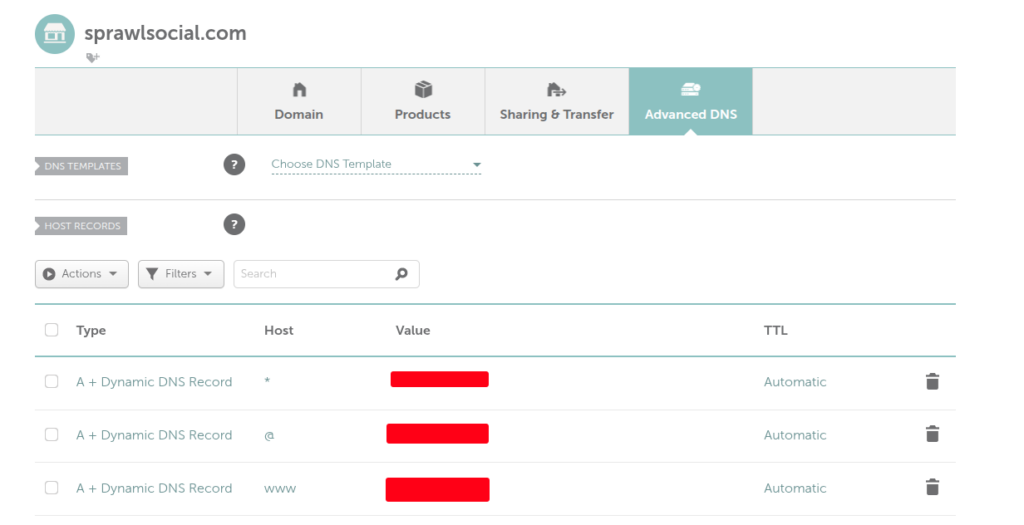
Make sure to update your records on your domain provider to your DDNS service; or in this case with built in DDNS I have set my domain up on namecheap to use their built in system as seen below.
How does DDNS Work?
When your IP address changes, the computer on your home network can still access the internet. So we get a little script to run that points to where your IP address is kept on your domain provider or a service like Free DNS. This record will get updated with your new IP and traffic will continue flowing!
First just on your local network ensure that you can SSH in.
You will want to find the IP address of the server you are setting up; typically I go to my routers IP / settings page. Look for the name of your server and note the IP.
We will want to use the username you created during the setup of Debian.
Something like this:
ssh user@192.192.23.2.0
You will typically then be prompted for your password.
If you are successfully able to ssh in then Congratulations!!!
Now because we have setup the domain and portforwarding aswell you should be able to do a ssh@yourdomain.com and enter in your password in the same manner. If you’re prompted for a fingerprint just say yes :).
Complete the steps for setting up Traefik however we DO NOT need to setup nextcloud right now.
Step 7. SMTP
Okay, so I read online that setting up your own SMTP server is quite difficult because of spam filtering on the majority of email providers. ~ This is a shame as I was hoping to self host as much as possible. There are many tutorials when it comes to setting up an SMTP server. In this case I have opted to use mailgun.
This site is setup to hopefully provide some digital services that may help people find alternatives to those typically offered by big tech.
So far on this server there is a mastodon instance. — m.sprawlsocial.com
And hopefully more to come.
If you would like to get involved in the maintenance of this space or discuss politics, tech etc in line with this project feel free to email lhorta@proton.me
. It’s easy to go down someone’s list of followings and just hit follow follow follow.